Database Migration with AWS Database Migration Service (AWS DMS) - Migrate your databases to AWS with minimal downtime
14+ years of overall IT experience in infrastructure assessment, migration, systems administration,cloud,kubernetes,monitoring,observability,devops,server automation and data center operations across various platform (AIX, Linux, Solaris,Windows) in large scale IT infrastructure within a large enterprise environment. I am a Cloud and DevOps enthusiast and quick learner, interested in learning new technologies.
AWS Database Migration Service (AWS DMS) is a versatile service that enables data migration between various commercial and open-source databases. It supports popular databases like Oracle, PostgreSQL, Microsoft SQL Server, Amazon Redshift, Amazon Aurora, MariaDB, and MySQL.
With AWS DMS, you can perform homogeneous migrations within the same database platform or heterogeneous migrations across different platforms. It also allows you to migrate from self-managed databases to fully managed AWS databases of the same engine.
Additionally, AWS DMS offers Schema Conversion capabilities, automatically assessing and converting source schemas to a new target engine. Alternatively, you can use the AWS Schema Conversion Tool (AWS SCT) on your local PC to convert source schemas.
In this article, we will discuss database migration using a source MySQL database to a target Amazon RDS for MySQL database with the help of the AWS Database Migration Service.
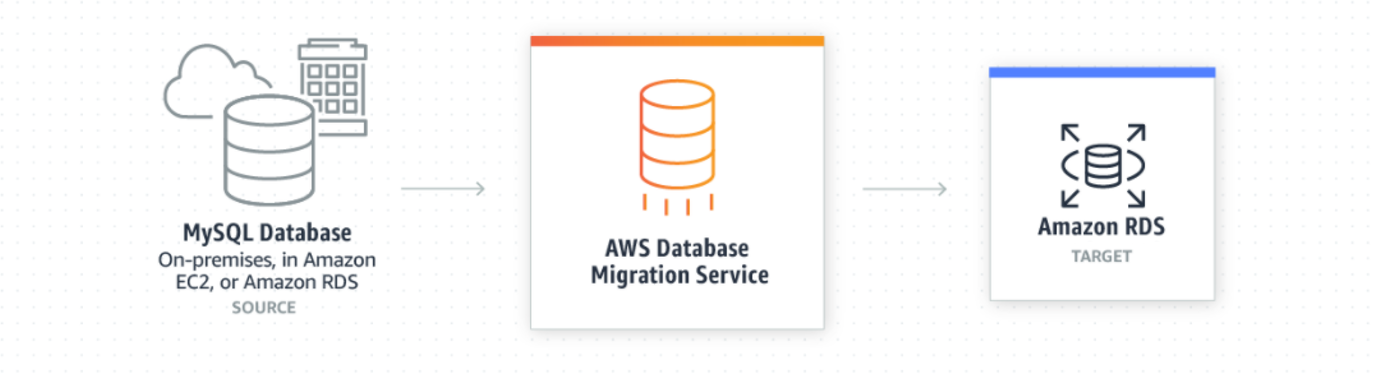
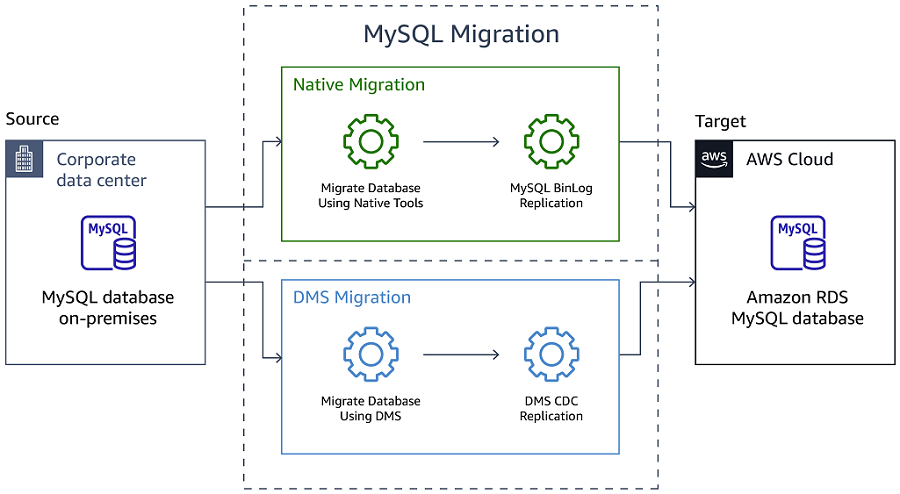
You can use these two main approaches for migrating a self-managed MySQL database to an Amazon RDS for MySQL or Amazon Aurora MySQL database.
Use a native or third-party database migration tool such as mysqldump to perform the full load and MySQL replication to perform ongoing replication. Typically this is the simplest option.
Use a managed migration service such as the AWS Database Migration Service (AWS DMS). AWS DMS provides migration-specific services such as data validation that are not available in the native or third-party tools.
The following diagram displays these two approaches.
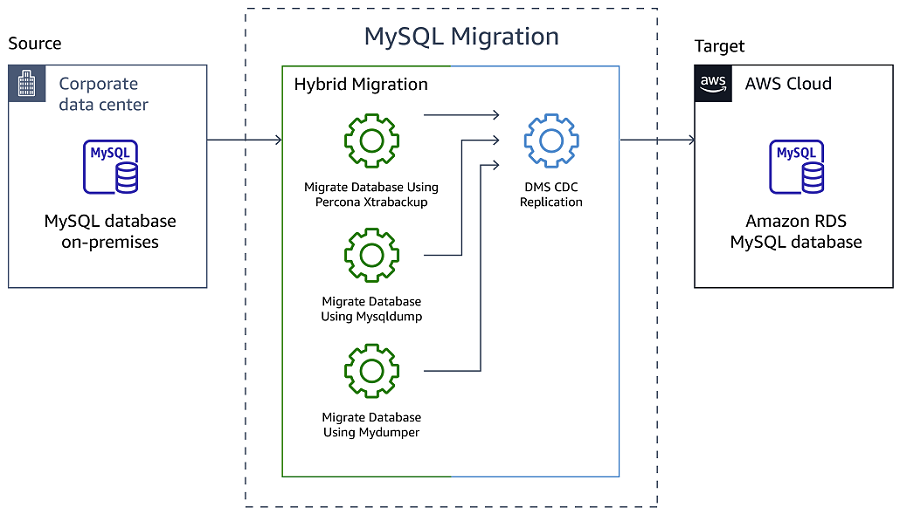
You can use a hybrid strategy that combines native or third-party tools for full load and AWS DMS for ongoing replication. The following diagram displays the hybrid migration approach.
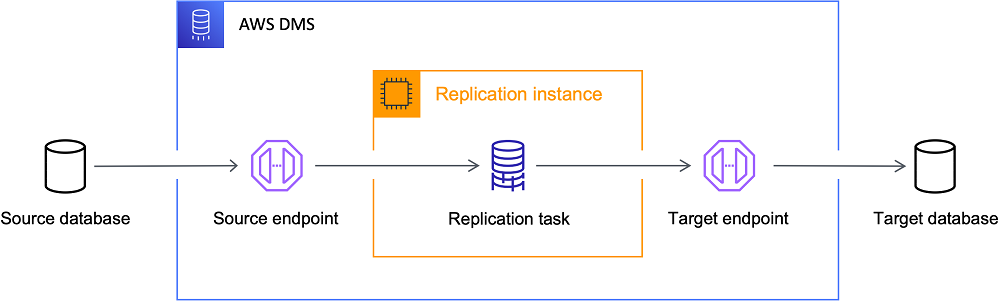
The following diagram illustrates the AWS DMS replication process.
Which AWS DMS features are free?
The AWS DMS Free Tier includes up to 750 hours per month for a Single-AZ dms.t2.micro instance. Depending on the feature, there is a cost based on usage. For Fleet Advisor and Schema Conversion, you only pay for the storage used. For DMS migration options, whether using replication instances or serverless options, you pay for what you use by the hour. See AWS DMS pricing for more details.
AWS Database Migration Service: Key Benefits
Simple to use: No installations or source database changes required; initiate migration with a few clicks.
Minimal downtime: Source database remains operational during migration, with continuous replication to the target.
Cost-effective: Pay only for compute resources used and additional log storage; affordable for large-scale migrations.
Reliable: Highly resilient and self-healing service, automatically resumes migration after interruptions.
Ongoing replication: Supports one-time migration and continuous replication tasks with minimal latency.
Developer productivity: Enables migration for development purposes, both into and out of the cloud.
Database consolidation: Consolidate multiple source databases into a single target database, regardless of location or platform.
AWS DMS Fleet Advisor
AWS DMS Fleet Advisor is a free, fully managed capability of AWS Database Migration Service (AWS DMS). It automates migration planning and helps you migrate database and analytics fleets to the cloud at scale with minimal effort. To accelerate migrations, AWS DMS Fleet Advisor automatically inventories and assesses your on-premises database and analytics server fleet and identifies potential migration paths.
The following diagram illustrates the AWS DMS Fleet Advisor Target Recommendations process.
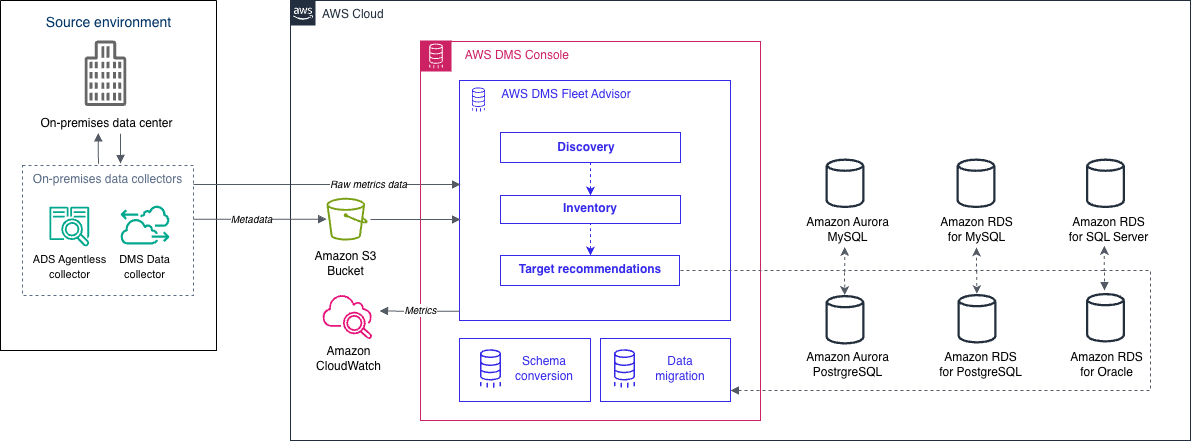
DMS Fleet Advisor collects metadata and performance metrics from multiple database environments.
It provides insight into your data infrastructure without needing to install it on every computer.
Supported database servers include Microsoft SQL Server, MySQL, Oracle, and PostgreSQL.
Build an inventory of database servers based on data discovered from the network.
Analyze the feasibility of database migrations using collected information about servers, databases, and schemas.
DMS Fleet Advisor generates right-sized target recommendations for databases intended to migrate to AWS.
Recommendations consider metrics from data collectors and preferred settings.
Detailed information for each target database configuration is available for review.
Target Recommendations assist database engineers and administrators in planning on-premises database migrations to AWS.
For the list of supported source databases, see Sources for DMS Fleet Advisor.
For the list of databases that DMS Fleet Advisor uses to generate target recommendations, see Targets for DMS Fleet Advisor.
High level steps of implementation of AWS Database migration service and some of the screen grabs from my AWS console.
Connect the source database server and review the database.
Create a new managed database using AWS RDS.


Create Replication instance


Configure Source database.
a. Configure the database to run the DMS Replication Task with Change Data Capture (CDC).
More About CDC @ https://aws.amazon.com/blogs/database/aws-dms-now-supports-native-cdc-support/ .
b. Provide additional privileges to database user.
cd ~ mysql -u root -p<PASSWD>
GRANT REPLICATION CLIENT ON . to 'wordpress-user'; GRANT REPLICATION SLAVE ON . to 'wordpress-user'; GRANT SUPER ON . to 'wordpress-user'; exit

c. Ensure BINARY LOGGING STATUS was ON.
cd ~
mysql -u root -p<PASSWD>
select variable_value as "BINARY LOGGING STATUS (log-bin) :: " from performance_schema.global_variables where variable_name='log_bin';
select variable_value as "BINARY LOG FORMAT (binlog_format) :: " from performance_schema.global_variables where variable_name='binlog_format';
exit

Create Source and Target endpoints.
a. Source End Point:


b. Target End point:


Create and Run a Replication Task.


Validate the target database "targetrdsdatabase".
We have successfully completed the database migration from source MySQL database to target AMAZON RDS for MySQL database and validated the migrated database.
To learn more about the AWS Database Migration Service, please follow the AWS documentation.
AWS Documentation Links:
How AWS Database Migration Service works -> https://docs.aws.amazon.com/dms/latest/userguide/CHAP_Introduction.html
Database Migration Step-by-Step Walkthroughs -> https://docs.aws.amazon.com/dms/latest/sbs/dms-sbs-welcome.html
Automating database migration and refreshing activities with AWS DMS
If you are planning to migrate your existing databases to AWS, seeking assistance from AWS and its partners can greatly simplify the process. AWS offers a comprehensive suite of migration services and tools to facilitate a seamless transition, while its extensive partner network brings specialized expertise and experience in database migration. By leveraging the combined resources and knowledge of AWS and its partners, you can ensure a successful and efficient migration of your databases to the AWS platform.
Thank you for reading! If you're interested in getting notifications for my future articles, please follow me.
Disclaimer: The content of this article is based on information obtained from AWS (Amazon Web Services) documentation and materials. All copyrights, trademarks, and intellectual property rights related to AWS belong to Amazon.com, Inc. or its affiliates. This article is not an official publication of AWS, and the views and opinions expressed herein are solely those of the author, not AWS. The author does not claim any endorsement or affiliation with AWS. Readers are encouraged to refer to the official AWS documentation for complete and up-to-date information.